

Setting up a broadcast journalism lab that prepares students for professional careers while staying within budget requires careful planning, strategic equipment selection, and thoughtful space design. This comprehensive guide walks you through every component of building a world-class facility that serves your students, faculty, and institution for years to come.
A properly designed broadcast journalism lab does more than teach technical skills. It creates an environment where students develop the confidence, creativity, and competence needed to succeed in modern media production. Whether you’re building from scratch or upgrading an existing facility, the decisions you make today will impact your program’s reputation and your students’ career readiness tomorrow.
Understanding the Core Mission of Your Broadcast Lab
Before selecting equipment or designing floor plans, define what your broadcast journalism lab needs to accomplish. The most successful university facilities balance three critical objectives: providing hands-on learning experiences that mirror professional workflows, offering flexibility to adapt as media technology evolves, and creating an environment where students can safely experiment and learn from mistakes.
Your lab should support multiple learning outcomes simultaneously. Students need exposure to multi-camera studio production, field reporting with portable equipment, live streaming and digital distribution, audio production for various platforms, and collaborative newsroom-style workflows. Each of these areas requires specific infrastructure, but the most effective labs create integrated spaces where students understand how all these components work together.
Essential Control Room Infrastructure
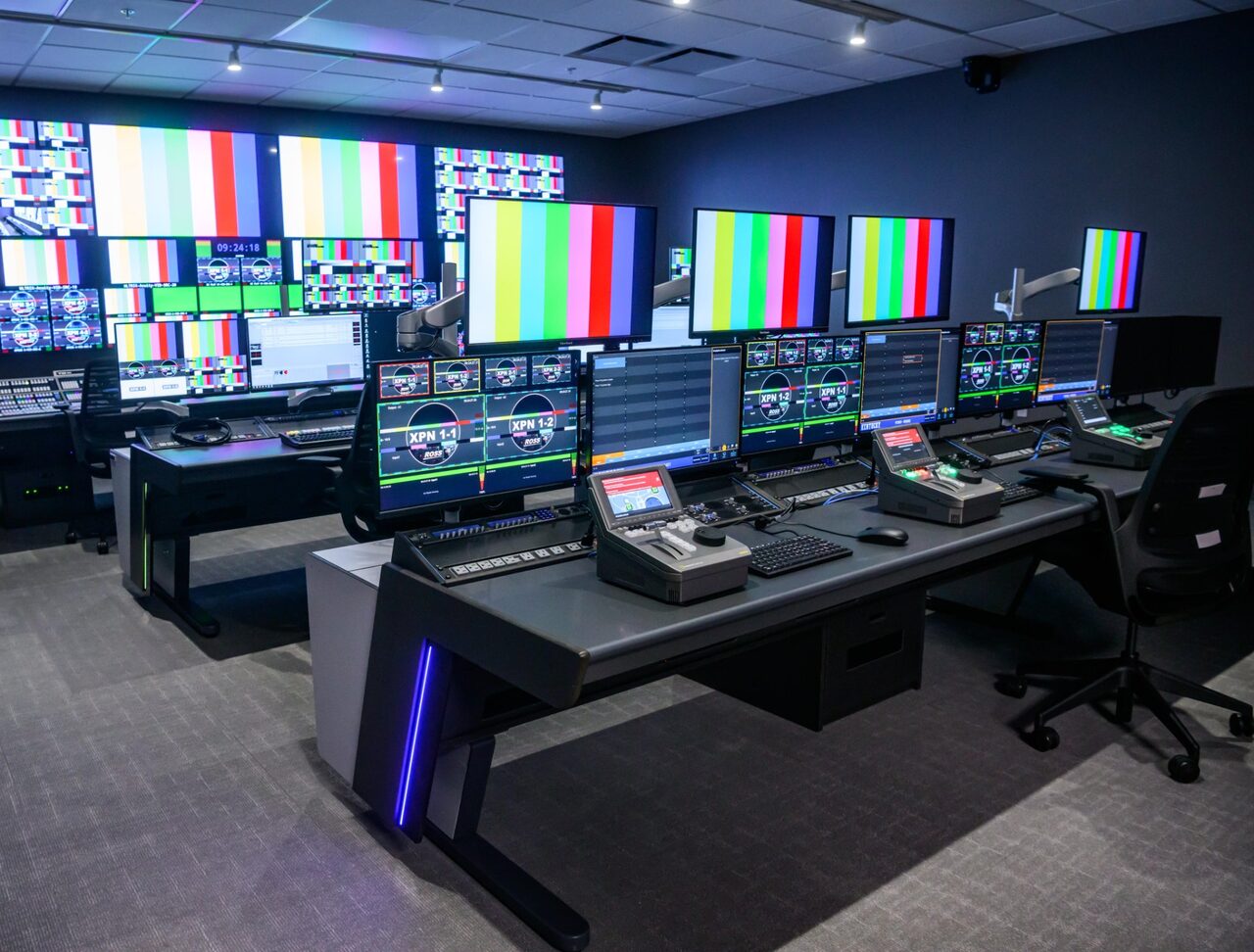
The control room serves as the nerve center of your broadcast journalism lab. This is where students learn to direct live productions, manage technical operations, and make real-time decisions under pressure. A well-designed control room provides clear sightlines, intuitive equipment placement, and enough space for both operators and instructors to work together effectively.
Your control room infrastructure needs to support video switching and routing that permits students to select between multiple camera feeds, graphics sources, and playback devices. Modern switchers should offer professional transitions, multiple Mixed Effects (ME) busses and Keyers, and the ability to create sophisticated compositions. Audio mixing capabilities must handle multiple microphone inputs, music beds, sound effects, and program audio, all while teaching proper level management and live mixing techniques.
Graphics and character generator systems enable students to create lower-thirds, full-screen graphics, animated transitions, and data visualizations in real time. Monitor walls and multiviewers give operators visual access to every input and output simultaneously, teaching the critical skill of managing multiple information streams.
Communication systems including program monitoring, intercom for crew coordination, and IFB (interruptible foldback) for talent communication round out the essential infrastructure.
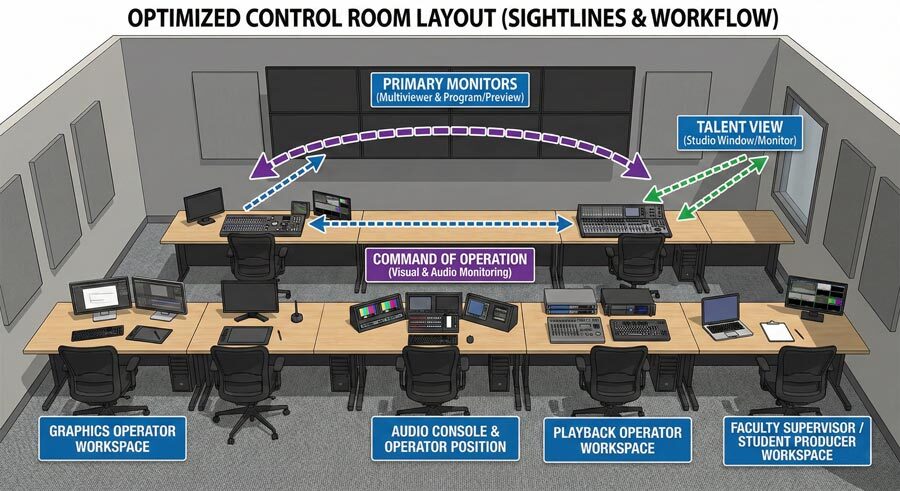
The physical layout of your control room matters as much as the equipment inside it. Position the technical director where they have direct sightlines to all primary monitors. Place the audio console where the operator can see both the talent and the technical director. If able, this should be located it’s own isolated room.
Ensure the director’s position offers command of the entire operation with clear visual and audio monitoring. Create adequate workspace for a graphics operator, playback operator, and at least one faculty supervisor or student producer.
Video Production Equipment Selection
Camera systems form the backbone of any broadcast journalism program. Your lab needs a mix of equipment types to prepare students for diverse production environments. Studio cameras should be broadcast-quality units mounted on pedestals or tripods, offering students experience with professional controls for iris, zoom, and focus. These cameras teach fundamental composition, shot framing, and camera operation skills that transfer directly to professional settings.
For programs requiring portable production capabilities, field cameras provide the portability students need for news gathering, documentary work, and remote production. Select models that balance professional features with student-friendly operation, including built-in neutral density filters, professional audio inputs, and proper manual controls.
Strategic planning and design services ensure you have adequate support equipment including professional tripods with fluid heads, shoulder mounts for run-and-gun shooting, and stabilization systems for dynamic camera movement.
Your lab also needs recording and playback systems that support modern workflows. Video servers or playback systems deliver instant replay, pre-recorded package integration, and multi-channel ingest capabilities. Consider systems that support file-based workflows, enabling students to move seamlessly between field production, editing, and live broadcast.
Audio Systems That Teach Professional Standards
Audio quality separates professional broadcasts from amateur productions, yet it remains one of the most overlooked aspects of student training. Your broadcast lab must provide comprehensive audio education through properly designed systems and adequate equipment variety.
Studio audio infrastructure begins with a broadcast-grade audio console that offers sufficient input channels, proper EQ and dynamics processing, and professional monitoring capabilities. Students should learn to mix live audio with multiple microphone sources, music beds, sound effects, and pre-recorded packages. The console should be sophisticated enough to teach professional techniques while remaining accessible for learning.
Microphone selection impacts both production quality and educational value. Stock your lab with:
- Wired handheld microphones for stand-up reporting and interviews
- Wireless lavalier systems for studio and field production
- Shotgun microphones for field audio and documentary work
- Studio microphones for voice-over recording and podcasting
- and headset microphones for sports commentary and specialized applications
Audio monitoring requires careful attention to room acoustics and speaker placement. Install studio monitor speakers at proper listening positions, provide high-quality headphones for critical listening and editing, and ensure your control room has basic acoustic treatment to minimize reflections and standing waves. Students who learn in properly designed audio environments develop better listening skills and produce higher quality work.
Lighting Design for Broadcast Quality
Professional lighting transforms mediocre productions into broadcast-quality content, yet many university labs treat lighting as an afterthought. Proper lighting infrastructure teaches students the technical and aesthetic principles they’ll use throughout their careers.
Studio lighting systems should offer complete flexibility for various production types. Install a flexible lighting grid or rail system to repositioning as needed. A three-point lighting setup—key, fill, and back lights—covers standard interview and presentation needs. Including both tungsten and LED fixtures gives students hands-on experience with color temperature differences and introduces them to modern energy-efficient lighting technology.
Background and set lighting creates depth and visual interest in studio productions. Cyc lights for even background illumination, colored gels for creative lighting effects, and practical lights incorporated into set design all contribute to professional-looking broadcasts. Ensure students have access to dimming and control systems, preferably with DMX capability for advanced lighting students.
Field lighting equipment rounds out your lighting inventory. Portable LED panels for interviews and news packages, battery-powered lights for remote locations, and reflectors and diffusion materials for controlling natural light ensure students can achieve professional results in any environment.
Studio and Set Design Considerations
The physical space where students produce content profoundly impacts both learning outcomes and production quality. Professional studio design and integration requires balancing educational needs with professional functionality.
Your main production studio should accommodate multiple camera positions with proper spacing for movement and operation. Provide adequate ceiling height for lighting grids and overhead equipment. Include sufficient electrical capacity distributed throughout the space, along with proper climate control to manage heat from lighting and equipment. Acoustic treatment on walls and ceilings minimizes echo and external noise.
Set design infrastructure might include modular set pieces that reconfigure for different show formats, a green screen or chroma key wall for virtual set applications, a news desk or anchor position with proper height and dimensions, and interview areas with comfortable seating and appropriate backgrounds. Flexibility is key—students should be able to create various production environments within the same physical space.
Support spaces complement your main studio. A control room with proper sightlines and equipment layout, an audio recording booth for voice-over work and podcasting, equipment storage with proper organization and security, an editing suite with adequate workstations, and a classroom or briefing area for pre-production planning and critique sessions all contribute to a fully functional facility.
Network Infrastructure and Signal Flow
Modern broadcast facilities operate on network-based infrastructures that provide flexibility, scalability, and integration with emerging technologies. Your university lab should prepare students for IP-based production environments they’ll encounter professionally.
Video and audio routing systems form the technical backbone of your facility. Traditional baseband routing remains relevant for many applications, but consider hybrid systems that bridge traditional SDI with IP-based infrastructure. This approach provides reliability while exposing students to emerging standards like SMPTE ST 2110.
Network infrastructure must support high-bandwidth video and audio streams, control data for equipment operation, file transfer for post-production workflows, and internet connectivity for streaming and remote production. Work with your IT department to ensure adequate network capacity, proper VLANs for broadcast traffic isolation, and Quality of Service (QoS) configurations that prioritize time-sensitive traffic.
Storage and media management systems enable efficient workflows and protect student work. Implement centralized storage accessible from multiple workstations, automated backup systems to prevent data loss, and media asset management software for organizing content. Consider how students will move projects between field production, editing, and broadcast environments.
Post-Production and Editing Facilities
While live production receives significant attention in broadcast journalism programs, post-production skills remain essential for modern media careers. Your editing facilities should provide professional-grade tools and adequate workspace.
Editing software selection typically centers on industry-standard platforms. Adobe Premiere Pro dominates professional video editing, DaVinci Resolve offers professional color correction and finishing, Avid Media Composer maintains relevance in broadcast news environments, and Adobe Audition or Pro Tools serves audio post-production needs. Site licensing or educational subscriptions make these tools accessible to students.
Workstation specifications must support demanding video processing tasks. Current recommendations include multi-core processors (8+ cores for 4K editing), minimum 32GB RAM (64GB preferred for advanced work), dedicated GPU with substantial VRAM, fast SSD storage for active projects, and calibrated monitors for accurate color representation. Regular hardware refresh cycles keep your lab competitive with professional standards.
Post-production workflows teach students professional practices beyond just software operation. Implement proper project organization and file management, color correction and grading techniques, audio sweetening and mixing for broadcast, graphics creation and animation, and export settings optimized for various delivery platforms.
Students who learn professional workflows alongside software skills transition more successfully to professional environments.
Live Streaming and Digital Distribution
Modern broadcast journalism extends far beyond traditional television. Your lab must prepare students for multi-platform distribution including social media, sports broadcasting and live events, streaming platforms, and digital-first journalism.
Live streaming infrastructure connects your facility to global audiences. Hardware encoders or software solutions like OBS Studio, Wirecast, or vMix enable professional streaming. Integration with platforms including YouTube Live, Facebook Live, Twitch, and institutional platforms ensures students understand various distribution channels. Monitor bandwidth and network quality to maintain reliable streams.
Social media integration teaches students to engage audiences across platforms. Provide systems for creating vertical video for mobile platforms, graphics optimized for social sharing, cross-platform publishing workflows, and engagement monitoring and analytics. Modern journalists must understand how content performs across different media environments.
Digital asset management becomes increasingly important as students begin producing content for multiple platforms. Effective workflows typically include version control for different aspect ratios and formats, metadata that make content easier to find, rights management and usage tracking, and archiving strategies for preservation. Together, these practices closely mirror how professional newsrooms operate.
Classroom Integration and Training Spaces
The most effective broadcast journalism labs integrate hands-on production with classroom instruction. The design of the lab should support various teaching and learning activities.
Classroom areas within or adjacent to your production facilities give instructors a place to demonstrate concepts and critique student work. These spaces should include large displays for reviewing footage, wireless screen sharing for student presentations, and audio systems adequate for video playback. Flexible seating arrangements help accommodate different class sizes and activities.
Training stations are where students can practice specific skills before stepping into full production environments—camera operation, audio mixing on simplified consoles, lighting setup, and teleprompter use. This focused practice builds confidence and competence while reducing pressure on main production spaces.
Observation spaces add another layer of learning. Control room observation windows, for example, let students watch live productions without interfering with operations.
Safety and Accessibility Considerations
University facilities must meet safety standards and provide accessibility for all students. Build these considerations into your initial planning rather than retrofitting later.
Electrical safety requires professional installation and regular inspection of all power distribution systems. Provide adequate circuit capacity with appropriate breakers, ground fault protection in appropriate locations, clearly labeled emergency shutoffs, and cable management preventing trip hazards. Work with licensed electricians and follow all local codes.
Equipment safety protocols protect both students and expensive gear. Check-out procedures, regular maintenance schedules, proper storage practices, and insurance coverage all help keep things running smoothly while building accountability. Clear policies around equipment use—and consequences for negligence—encourage students to develop professional attitudes toward the tools they rely on.
Accessibility ensures all students can fully participate in broadcast journalism education. This means providing adjustable workstations, captioning and audio description tools, adequate lighting and contrast, and wheelchair access throughout the facility. Designing with universal access in mind benefits everyone while keeping you in compliance with legal requirements.
Budget Planning and Phased Implementation
Few universities have unlimited budgets for broadcast journalism facilities. Strategic planning ensures you maximize educational impact while managing costs effectively.
Prioritize essential infrastructure first. Core systems include basic camera and lighting packages, fundamental control room equipment, essential audio systems, and adequate editing workstations. These elements enable basic instruction and student production work. Advanced capabilities can be added as budget allows.
A phased implementation can spread costs over multiple budget cycles. For example, year one might focus on studio infrastructure and basic equipment, with advanced cameras and field gear following in year two. IP infrastructure upgrades and streaming or social media capabilities can come in later years. This approach keeps cash flow manageable while showing steady progress.
Strategic partnerships can stretch your budget significantly. Broadcast equipment manufacturers often offer educational discounts, and local stations may donate retired gear. Alumni working in media can open doors to valuable connections, while grants for journalism education or educational technology can supplement institutional funding. Building these relationships pays off well beyond a single budget cycle.
Maintenance and Technical Support
Even the best equipment fails without proper maintenance and support, so planning for ongoing operational needs from day one is essential.
Technical support staffing keeps your facility functional and your productions running smoothly. At minimum, you need someone responsible for equipment maintenance and troubleshooting, software updates and licensing management, student training on equipment operation, and inventory and scheduling oversight.
Depending on your institution’s resources, this role may be filled by dedicated staff, faculty with release time, or trained student workers. When internal resources or expertise are limited, companies like TakeOne can provide supplemental technical support through customized service agreements, ensuring your facility maintains consistent, reliable operation.
Preventive maintenance extends equipment life and prevents failures during critical productions. Establish regular cleaning and inspection schedules, firmware and software update protocols, and periodic calibration and alignment procedures. Maintain relationships with repair services for warranty work and major repairs, and keep spare parts for common failure points. An equipment malfunction during a student production creates a teachable moment about professional backup planning, but chronic reliability issues undermine your program’s credibility.
Documentation and training materials help students and faculty maximize your facility’s capabilities. Maintain equipment manuals and quick-reference guides, standard operating procedures for common productions, troubleshooting flowcharts for typical problems, and video tutorials for complex operations. Well-documented facilities operate more efficiently and reduce support burden.
Measuring Success and Continuous Improvement
The most effective broadcast journalism programs regularly assess their facilities and outcomes, using data to drive improvements.
Student learning outcomes should guide facility assessment. Track student confidence with professional equipment, technical competency across various production roles, portfolio quality compared to industry standards, and post-graduation employment in media fields.
These metrics reveal whether your facility adequately prepares students for careers.
Usage metrics inform facility planning and expansion.
What you monitor matters:
- Equipment utilization rates
- Production hours by type and course
- Peak usage periods requiring additional capacity
- and recurring bottlenecks or scheduling conflicts.
Data-driven decisions about equipment purchases and facility modifications yield better results than assumptions.
Industry feedback validates your program’s relevance. Maintain relationships with professional broadcasters, invite industry professionals to review student work, track alumni career progression, and stay current with evolving industry standards and technologies. Your facility should evolve as the industry evolves.
Est. Equipment Specifications and Budget Breakdown
| Category | Entry-Level Budget ($) | Professional-Level Budget ($) | Key Components |
|---|---|---|---|
| Studio Cameras (3) | $15,000 – $25,000 | $45,000 – $135,000 | Broadcast cameras, pedestals, CCU, lenses |
| Field Cameras (6) | $18,000 – $30,000 | $40,000 – $100,000 | Camcorders, tripods, batteries, media |
| Video Switcher | $5,000 – $12,000 | $25,000 – $130,000 | Production switcher, control panels, I/O |
| Audio Console | $4,000 – $8,000 | $15,000 – $50,000 | Digital mixer, I/O, processing |
| Microphones | $3,000 – $6,000 | $8,000 – $30,000 | Wireless, wired, studio, field packages |
| Lighting System | $8,000 – $15,000 | $25,000 – $85,000 | Grid, fixtures, control, stands |
| Graphics System | $2,000 – $5,000 | $10,000 – $75,000 | Character generator, workstation, templates |
| Monitors & Displays | $6,000 – $12,000 | $20,000 – $50,000 | Studio monitors, multiviewers, confidence |
| Editing Workstations (12) | $24,000 – $36,000 | $48,000 – $110,000 | Computers, monitors, software licenses |
| Network Infrastructure | $10,000 – $20,000 | $35,000 – $95,000 | Routing, switching, cabling, installation |
| Storage Systems | $5,000 – $10,000 | $20,000 – $75,000 | NAS, backup, media management |
| Set & Studio Build-Out | $15,000 – $30,000 | $40,000 – $110,000 | Sets, backgrounds, furnishings, acoustic treatment |
| Streaming Equipment | $2,000 – $5,000 | $8,000 – $35,000 | Encoders, distribution, monitoring |
| Support Equipment | $8,000 – $15,000 | $20,000 – $75,000 | Cables, adapters, cases, accessories |
| Installation & Training | $10,000 – $20,000 | $30,000 – $125,000 | Professional installation, faculty training |
| TOTAL ESTIMATED COST | $135,000 – $249,000 | $389,000 – $1.28M | Complete turnkey facility |
Note: Prices reflect current market conditions and educational pricing where available. Actual costs vary based on specific equipment selections, facility size, existing infrastructure, and regional labor rates. Budget for annual maintenance and technology refresh cycles at 10-15% of initial investment.
Frequently Asked Questions
-
How much space do I need for a broadcast journalism lab?
A functional broadcast journalism lab requires approximately 2,500 to 4,000 square feet minimum, though larger is better. This should include a main production studio of 800-1,200 square feet, a control room of 250-400 square feet, an editing suite with 8-12 workstations requiring 600-900 square feet, equipment storage of 200-300 square feet, and a classroom or critique space of 400-600 square feet. The studio needs adequate ceiling height, ideally 12-14 feet minimum, for lighting grids and proper acoustics.
-
Should we buy new or used equipment?
A strategic mix often works best for university budgets. Purchase new equipment for core infrastructure like video switchers, audio consoles, and network routing that require reliability and long service life. Consider certified refurbished or previous-generation professional equipment for cameras, where models 2-3 years old offer excellent performance at significant savings. Avoid used equipment for anything involving computer workstations or rapidly evolving technology. Many manufacturers offer educational pricing that makes new equipment more affordable than you might expect.
-
What’s the typical lifecycle for broadcast equipment?
Different equipment categories have different lifespans, and planning for those refresh cycles is important. Audio gear tends to last the longest at 10–15 years with proper care, while video switchers and routing infrastructure typically hold up for 7–10 years. Cameras generally get 5–7 years of use, though field cameras may wear out sooner. Computer workstations need updating every 3–5 years to keep pace with evolving software. Factoring these timelines into long-term budget planning helps avoid surprises.
-
How do we keep up with rapidly changing technology?
Flexible infrastructure matters more than chasing every new trend. Routing and network systems that support both traditional and IP-based workflows give you room to adapt, and equipment with software-upgradable features tends to age more gracefully. Ongoing relationships with manufacturers who offer educational support and training can also help you get the most out of your investment. The goal is to ground students in fundamental production principles that apply regardless of the specific equipment they’re using. Relationships with professional broadcasters are especially valuable here—they can help you distinguish between emerging technologies that truly matter for careers and those that are just passing trends.
-
What staffing do we need to operate a broadcast lab?
Minimum staffing includes one technical director or broadcast engineer responsible for equipment maintenance, troubleshooting, and facility operations, ideally full-time for facilities supporting multiple courses. Faculty members need adequate training to supervise student productions safely and effectively. Many successful programs employ student workers for equipment checkout, basic maintenance, and peer training, which provides valuable experience while managing costs. As your program grows, consider adding a production manager who handles scheduling, coordinates productions, and manages equipment inventory.
-
How do we balance professional standards with student learning?
Create tiered access systems where students demonstrate competency before using advanced equipment. Implement mandatory training sessions before students check out expensive field cameras or operate complex control room systems. Design productions that scale in complexity, starting with basic multi-camera shoots before attempting live broadcasts. Use simulcast approaches where students can experiment with alternative production techniques while a backup system ensures a successful output. Most importantly, create a culture where mistakes are learning opportunities rather than failures, but where professional standards and respect for equipment are non-negotiable.
-
Should we prioritize studio production or field production capabilities?
Modern broadcast journalism requires both, but many programs find field production offers better return on investment for student learning. Portable cameras and equipment enable more students to produce more content more frequently. Field production teaches self-sufficiency and problem-solving essential to journalism careers. However, studio infrastructure teaches technical direction, live switching, and team coordination that field production cannot replicate. The ideal approach provides strong field capabilities with a modest studio that focuses on fundamental multi-camera and live production skills rather than trying to replicate professional broadcast facilities.
-
How do we integrate our broadcast lab with other campus facilities?
Look for strategic partnerships across campus. Coordinate with athletic departments to cover campus sports, creating content for streaming and experience for students. Connect with performing arts departments to broadcast concerts, theater, and events. Partner with campus IT to leverage network infrastructure and streaming platforms. Engage marketing and communications departments who need video content and can provide professional feedback. Establish relationships with campus television or radio stations for content distribution. These partnerships extend your lab’s impact while providing authentic production opportunities for students.
-
What about remote and cloud-based production?
The COVID-19 pandemic accelerated adoption of remote production workflows that remain relevant today. Consider cloud-based editing platforms that enable collaboration and remote access, remote camera control systems for distributed production, and virtual control rooms where students can operate equipment from multiple locations. However, maintain hands-on equipment experience as the foundation of your program. Remote and cloud tools supplement rather than replace physical facilities, and employers still expect graduates who understand traditional broadcast infrastructure.
-
How do we measure ROI on broadcast facility investments?
Track quantitative metrics including student enrollment in journalism and media production courses, student employment rates in media fields post-graduation, revenue from productions created for campus departments or external clients, and grant funding attracted by demonstrated production capabilities. Document qualitative outcomes through student portfolio quality, industry feedback on graduate preparedness, campus visibility of journalism program, and competitive advantage in recruiting students. The strongest case for continued investment combines hard numbers with compelling stories of student success and institutional impact.