

A practical roadmap for the decisions that matter most before construction begins.
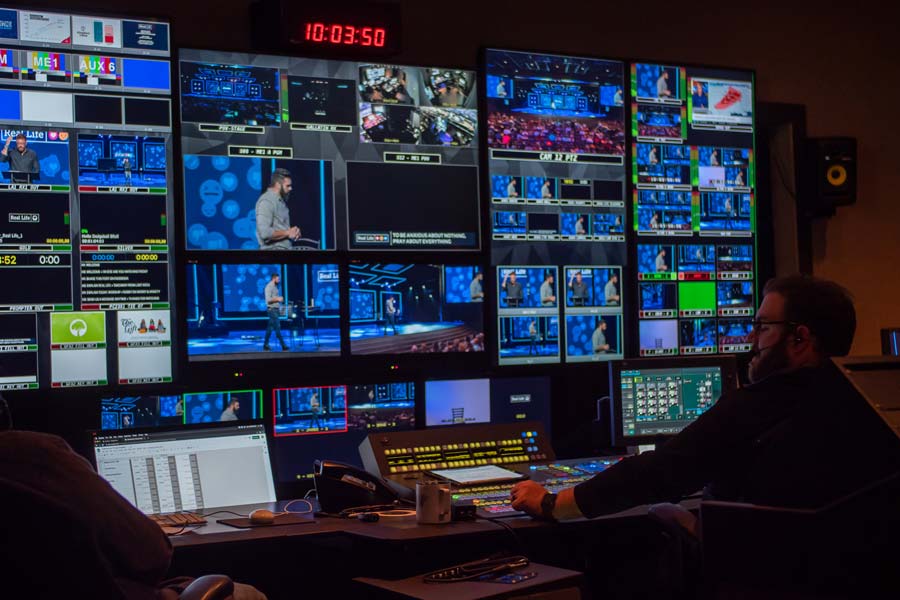
Building a broadcast control room is one of the most consequential investments a production facility will make. The room will outlast most of the equipment inside it. The layout will shape every production that runs through it for years. And the decisions made in the first few weeks of planning will determine whether the room works beautifully or fights the crew at every turn.
This guide walks through the planning process in the order decisions should actually be made. Not in the order most people think about them.
Start with the Mission, Not the Gear
The first mistake most teams make is jumping straight to equipment selection. They know they want a certain switcher or a specific camera system and they start building backward from there. The result is a room designed around a piece of equipment that will be replaced in five to seven years.
Instead, start with the mission. What will this room actually do? A sports venue control room that handles live multi-camera game broadcasts has fundamentally different needs than a church production room running a weekly livestream. A university broadcast lab training the next generation of journalists needs flexibility that a dedicated news studio does not.
Write down three things before anything else. What types of productions will run through this room? How many people need to work in it at peak capacity? And what happens when something fails during a live broadcast?
The answers to these three questions will drive every subsequent decision. They determine the room size, the operator layout, the equipment redundancy, and ultimately the budget.
Assess the Physical Space
Once the mission is clear, evaluate the physical room that will house the control room. If you are building new construction you have more flexibility. If you are converting an existing space you will face constraints that need to be identified early.
Room dimensions
A 2-operator room can work in 150 square feet. A full broadcast facility with 6-10 positions typically needs 400-800 square feet. Plan for enough depth to accommodate multiple console rows plus a rear equipment area or separate rack room.
Ceiling height
You need clearance for a monitor wall at the front of the room plus overhead HVAC and lighting. Nine feet is the minimum. Ten to twelve feet is ideal for larger rooms with video walls.
HVAC capacity
Control rooms generate far more heat than standard offices. Every monitor, computer, switcher, and rack-mounted device produces heat that the HVAC system must handle. Undersized cooling is the single most common post-installation complaint and it is expensive to fix after the fact.
Acoustic isolation
The control room needs sound isolation from the studio floor and from adjacent spaces. This includes sealed doors, acoustic wall treatment, and HVAC damping to prevent duct noise from bleeding into the room.
Map the Operator Layout
Before selecting a single piece of equipment, determine who will be in the room and what each person needs. This is the foundation of the console layout and the sightline plan.
A typical broadcast control room includes positions for the director, technical director, audio engineer, graphics operator, and sometimes a playback or server operator. In smaller facilities one person may handle multiple roles but the equipment for each function still needs a home.
The director belongs at the center with a clear view of the entire monitor wall. The technical director sits adjacent so they can communicate without shouting. The audio engineer often sits to one side with some physical separation for monitoring. Graphics and playback positions should be visible to the director for cueing.
Map these positions on paper before doing anything else. Walk the actual room if it exists. Sit in a chair at each position and look at where the monitor wall will go. Check the sightlines. This ten-minute exercise prevents thousands of dollars in rework later.
Select Equipment Based on Workflow
With the mission defined and the operator layout mapped, now you can select equipment. The key is to let workflow drive the choices rather than choosing equipment and then forcing the workflow around it.
- Video switcher: This is the heart of the room. Some switchers are narrowly focused on reliability for productions that cannot tolerate any failure. Others take an integrated approach with software-based production tools built in. Match the switcher to the type and complexity of your productions.
- Audio system: A dedicated audio mixing console or an integrated audio-follows-video approach depending on production complexity. Sports and music productions typically demand a standalone console. Simpler livestreams may work with embedded audio processing.
- Routing and distribution: How signals move between devices. This includes routers, distribution amplifiers, frame synchronizers, and the physical cabling infrastructure. Plan for more routing capacity than you need today.
- Monitoring: The monitor wall or multiviewer system. Every operator needs to see the right feeds at the right time. A multiviewer reduces the number of physical monitors needed but requires careful layout planning.
- Communication: Intercom and IFB systems that connect the control room to camera operators, floor managers, talent, and remote locations. Plan for enough channels and belt packs to cover all positions plus growth.
- Replay and graphics: Replay servers for sports productions and graphics systems for lower thirds, scoreboards, and full-screen graphics. These need dedicated operator positions with the right monitor and control surface setup.
Plan the Integration
Integration is where the plan becomes real. This phase covers equipment rack building, wiring, signal flow design, control system programming, and testing. It typically represents 30-50% of the equipment cost for a standard project.
A good integrator handles far more than plugging cables together. They translate your workflow into a physical system. They test every signal path before the room goes live. They build documentation that your team can reference for troubleshooting and future upgrades. And they train your operators so the team is confident on day one.
The biggest risk in any control room build is the gap between what you designed on paper and what actually works in practice. An experienced integrator bridges that gap.
If you are managing your own build, plan integration time equal to at least the same duration as the equipment installation. A room that takes two weeks to install will take at least two weeks to integrate and test.
Build the Budget
Control room budgets break down into five major categories. The percentages vary by project scale but the categories are consistent:
- Equipment (40-55%): Switchers, audio, routing, monitoring, communication, replay, graphics, cameras.
- Furniture and infrastructure (15-25%): Console desks, racks, monitor mounts, acoustic treatment, lighting, HVAC modifications, electrical work.
- Integration (15-25%): Rack building, wiring, signal flow design, control programming, testing, documentation.
- Installation (5-10%): Physical mounting, cable pulling, equipment placement, and site preparation.
- Contingency (10-15%): Unexpected costs in construction, cable runs, equipment compatibility, and scope changes.
The most common budgeting mistake is leaving furniture and integration for last after equipment choices consume the available funds. This results in expensive equipment mounted in inadequate furniture with rushed integration that produces ongoing problems.
Planning a Control Room Build?
Download our Complete Control Room Planning Guide for a detailed framework covering every phase from mission definition through operator training.
Or request a free control room assessment. We will review your space, your goals, and your budget and provide a detailed project plan.
About TakeOne Broadcast Solutions
TakeOne is a full-service broadcast video integrator and consultant that designs, builds, and supports professional video systems for sports venues, universities, churches, and broadcast facilities nationwide. From control room design through equipment integration and operator training, we handle every phase of the project.
Request a control room assessment or call 1-877-818-2531 to discuss your project.